
Managed Antivirus Protection with Remote Support

Cyber threats continue to evolve, and relying on traditional antivirus alone is no longer enough. Businesses and home users alike need protection that not only blocks threats but also ensures the security software itself is working properly.
Avast Business CloudCare Security combines Avast’s well-known antivirus protection with a managed monitoring platform, allowing your IT provider to oversee the health and status of your protection in real time.
As an authorized Avast CloudCare reseller, TwinBytes monitors and manages this platform for our clients so problems can be detected and corrected before they become security incidents.
What is Avast CloudCare?
Avast CloudCare is a cloud-managed security platform that allows IT providers to monitor and manage protection across multiple computers from a central dashboard.
Unlike standard antivirus products that run independently on each computer, CloudCare allows TwinBytes to verify that your protection is working correctly.
This includes monitoring things such as:
• Whether real-time protection is active
• Whether scheduled scans are running
• Whether virus definitions are updating
• Whether threats were detected or removed
• Whether the device has stopped communicating with the security system
If something stops working properly, we can often correct the problem remotely before you even notice.
How Long Has Avast Been Around?
Avast has been developing security software since 1988, making it one of the longest-standing cybersecurity companies in the industry. For comparison:
• McAfee was founded in 1987
• Avast was founded in 1988
• Norton Antivirus was introduced in 1991
This means Avast began developing antivirus technology even before Microsoft Windows became widely used.
You can read more about their history here:
https://www.avast.com/history
What Services Can Avast CloudCare Provide?
CloudCare is a modular platform, meaning businesses can choose only the services they need. Common services include:
• Managed Antivirus / Endpoint Security
• Managed Firewall Monitoring
• Content Filtering (control website access)
• Anti-Spam Protection
• Email Encryption
• Managed Online Backup
• Remote IT Support
Each component can be enabled separately, allowing organizations to build a security package tailored to their needs.
Many TwinBytes clients even use CloudCare for personal computers at home, because the pricing is often comparable to retail antivirus products while providing professional monitoring and remote support capabilities.
Avast CloudCare vs Standard Antivirus
When someone installs antivirus software themselves, they usually assume it is always working correctly. Unfortunately, that is not always the case.
Over the past 20+ years supporting computers, we have seen many situations where antivirus software silently stopped working without the user realizing it.
Common issues include:
• Real-time protection accidentally disabled
• Antivirus updates failing
• Scheduled scans not running
• Malware detected but not removed
• Security software corrupted after Windows updates
Without monitoring, these problems can go unnoticed for long periods of time.
What CloudCare Monitoring Adds
With CloudCare, TwinBytes can monitor and manage the following behind the scenes:
• Verify real-time protection is active
• Verify virus definitions are up to date
• Confirm scheduled scans are running
• Detect when threats were found but not removed
• Check when a device stops communicating with the security system
Additional helpful system insights can also be seen, including:
• Hard drive space running dangerously low
• Memory usage unusually high
• Device communication issues
This helps us identify problems early and often resolve them remotely before they impact your work.
Built-In Remote IT Support
One of the biggest advantages of CloudCare is that it includes an unattended remote support tool. This means if you call TwinBytes for help, we can often connect to your computer immediately without needing you to install additional software.
This can save time and avoid the frustration of downloading temporary remote support tools.
It also allows us to help in situations where users might otherwise be stuck — for example when troubleshooting login problems or configuration issues.
Avast CloudCare vs SentinelOne

While Avast CloudCare provides strong antivirus protection and convenient remote support tools, some businesses require more advanced threat detection capabilities. This is where SentinelOne comes in.
SentinelOne uses Endpoint Detection and Response (EDR) technology, which analyzes behavior on the system to detect threats that traditional antivirus may miss. Below is a simplified comparison.
| Feature | Avast CloudCare | SentinelOne |
|---|---|---|
| Antivirus protection | ✔ Yes | ✔ Yes |
| Advanced Firewall | ✔ Yes | ✔ Yes |
| Central management console | ✔ Yes | ✔ Yes |
| Unattended Remote IT support tool | ✔ Included | ✖ Not included |
| Behavior-based threat detection (EDR) | Limited | ✔ Advanced |
| Ransomware protection | ✖ Not included | ✔ Advanced |
| Automated threat response | Limited | ✔ Yes |
| Regular scheduled scans | ✔ Yes – Required | ✖ Not Required (Does real time scanning) |
| Best suited for | Managed antivirus + remote support | Advanced enterprise-grade protection |
For many environments, the best solution may involve combining tools depending on the needs of the business.
TwinBytes can help evaluate which solution best fits your security requirements.
CloudCare Monitoring Portal
CloudCare provides a management dashboard that allows TwinBytes to see the status of all protected devices at a glance.
From this portal we can quickly identify issues such as:
• Virus detections
• Devices that stopped communicating
• Failed updates or scans
• System health alerts
This centralized monitoring allows faster response times and improved security visibility.
Manual Upgrade to the Latest Version
CloudCare typically upgrades automatically, but sometimes you may be asked to manually run the upgrade tool if there is a communication issue or if TwinBytes recommends updating immediately.
You can safely run the upgrade using the link below.
[LINK: CloudCare Upgrade Tool]
After clicking the link, the upgrade process may appear to run silently in the background. Allow a few minutes for the update to complete before checking the version number.
How to Check Your Current Version
To check which version of Avast Business is installed:
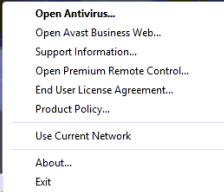
- Right-click the Avast icon near the clock in your system tray (By your date/time).
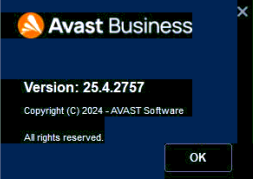
- Click About.
A window will open showing your current version information.
Check CloudCare Service Status
If you ever experience issues installing, upgrading, or connecting to the CloudCare service, you can check the official service status page.
CloudCare Status Page:
http://status.cloudcare.avg.com/
This page shows whether there are any active outages affecting the platform.
How to Refresh Your Connection to the Managed Service
If scheduled scans or policies do not appear to be updating correctly, you can refresh your connection to the CloudCare service. To do this:
- Hold down the Ctrl key on your keyboard.
- While holding Ctrl, right-click the Avast icon in the system tray (By your date/time).
- Two additional options will appear:
• Clear Cache
• Reauthenticate
First select Clear Cache. Then repeat the process (1 and 2) and select Reauthenticate.
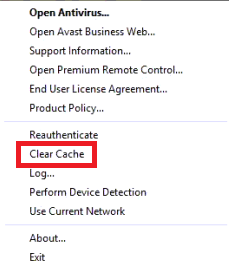
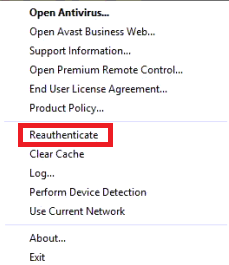
The process may appear silent, but it refreshes your connection to the management server. If settings still appear incorrect, contact TwinBytes and we will verify your security policy settings.
Changing Firewall Settings
Firewall configuration options are explained in detail on our blog, including step-by-step instructions and screenshots.
[LINK: Firewall configuration blog post]
Because Avast acquired AVG, some settings and interface elements may look slightly different depending on your version.
How to Disable Remote Access
Remote support is included with Avast CloudCare to make it easy for TwinBytes to help when needed.
For example, if you are locked out of your computer or experiencing a technical problem, we can often connect quickly and resolve the issue. However, you can disable remote access at any time if you prefer.
To disable remote access:
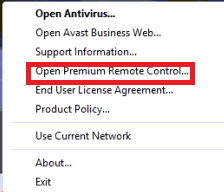
- Right-click the Avast icon in the system tray (near the date/time)
- Click Open Premium Remote Control
- Remove the checkmark for Allow remote connections to this device
- Click Close
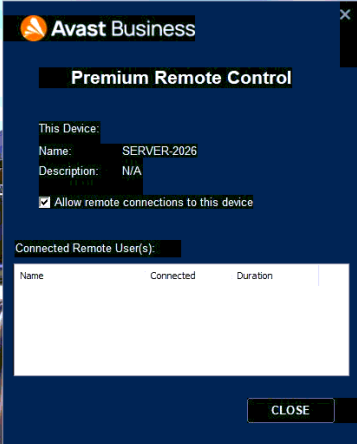 That’s it. If you later need help again, you can simply re-enable the option.
Note: If remote access is disabled and you become locked out of your computer, remote assistance may not be possible and an onsite visit could be required.
Need Help Choosing the Right Security?
Cybersecurity solutions can vary widely depending on your needs. Some organizations prefer managed antivirus solutions like Avast CloudCare, while others require advanced endpoint protection platforms such as SentinelOne.
TwinBytes can help you evaluate your environment and recommend the right level of protection.
📞 Call: (905) 471-5904
📧 Email: support@twinbytes.ca
Ask us how managed antivirus and endpoint security can help protect your computers and your business.